
AI 3D建模工具: Tripo 3D | Meshy AI
我的爱好之一是参加按需印刷网站Spoonflower上发布的设计挑战赛。每两周会有一个新的主题和提示。参赛艺术家需要提交与主题对应的重复图案(即表面图案)。获胜者可以获得曝光和现金奖励。但比潜在奖品更重要的是,这些挑战赛创造了截止日期和结构,帮助我真正去练习创作。和所有按需印刷网站一样,Spoonflower上充斥着大量设计。如果你已经有一个可以引导到店铺的受众群体,你在Spoonflower上获得收入的可能性会大得多。虽然我还没有认真尝试将这个爱好变现(我可能也不应该这样做),但我一直在努力维持一个Instagram账号来分享我的作品。然而,我发现在完成一个设计之后,额外的内容创作、文案撰写、发布等步骤显得极其繁琐。我感到很沮丧,因为我在一遍又一遍地创建同样的帖子——一张带有我账号的静态设计图片。这正是效果图的用途所在——一种无需购买几码布料并缝制裙子就能让你的设计生动呈现的方式。Spoonflower也制作效果图,但它们风格重复、不可下载,而且非常容易被认出是"Spoonflower效果图"。我目前也没有时间和材料来制作自己的效果图模板。
与此同时,我也在学习更多关于AI代理的知识。我从图书馆借了Ben Auffarth和Leonid Kuligin的《Generative AI with LangChain》(老派做法),这变成了一个小项目!当我开始这个项目时,Gemini的免费版包含对Nano Banana的API访问。遗憾的是现在已不再如此。
我期望的输出:
- 三种不同的效果图供选择(壁纸、服装和家居装饰)
- 每张效果图配一段适合Instagram的文案
最初,我还想实现内容的自动发布。这是在我研究Instagram API之前(哎)。所以目前我们只是将内容保存到Google Drive。
我的输入:
- 图案的基本单元块
- 设计挑战赛的主题和提示,提供有用的上下文
- 我之前写的一些Instagram文案,帮助确定语调
在编写任何代码之前,我在Nano Banana和ChatGPT的UI中尝试了不同的提示词和输入。
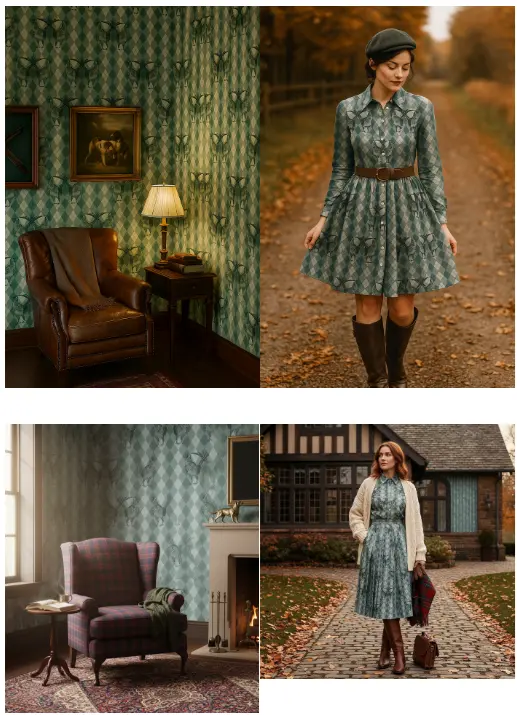
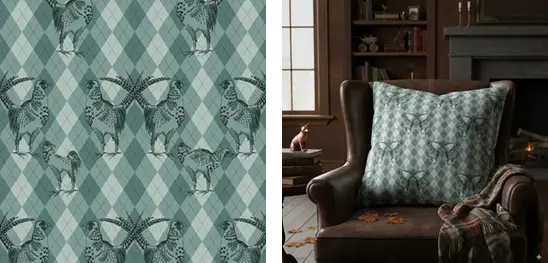
当我把单个瓦片给LLM并让它重复时,效果图画得不太好。LLM在保持图案的细节和准确性方面有很大的困难,即使我尝试通过提示词来保持图案的一致性。Nano Banana的照片编辑能力在发布时受到了赞誉,所以我认为它可能配备了某种编辑工具来处理像重复图案这样简单的任务。因此,我不是传入单个瓦片,而是先用PIL将其重复多次生成一张图片,然后将它作为LLM的输入。比较Gemini和ChatGPT的输出,我确实更喜欢ChatGPT的图片,因为它们看起来更逼真。
1、开始吧!
安装langchain_google_genai库。在Colab中运行,我挂载了Google Drive用于存储,并使用Colab的密钥管理器传入Google API密钥。
pip install langchain_google_genai
from google.colab import userdata
from google.colab import drive
from langchain_google_genai.chat_models import ChatGoogleGenerativeAI
from langchain.schema.runnable import RunnablePassthrough, RunnableLambda
from langchain_core.prompts import ChatPromptTemplate
from langchain_core.messages import HumanMessage, AIMessage
from langchain_core.output_parsers import StrOutputParser
import base64
import IPython
from io import BytesIO
import os
from PIL import Image, ImageDraw, ImageFont
import shutil
import time

# This is a helpful function from the LangChain Docs to decode generated images.
def _get_image_base64(response: AIMessage) -> str:
    """Extracts the base64 image data from an AIMessage response."""
    image_block = next(
        (block for block in response.content if isinstance(block, dict) and block.get("image_url")),
        None
    )
    if image_block:
        return image_block["image_url"].get("url").split(",")[-1]
    return None

GOOGLE_API_KEY = userdata.get('GOOGLE_API_KEY')
input_path = '/content/drive/My Drive/Design/Spoonflower/0_input'
output_path = '/content/drive/My Drive/Design/Spoonflower/0_output'
以下是我使用的所有提示词。设计挑战赛的主题用于为效果图提供额外的上下文(例如,如果挑战赛是关于制作温馨的设计,效果图也应该感觉温馨)。我还传入了之前的一些Instagram文案作为写作样本,鼓励Nano Banana以类似的风格生成文案。
mockup_system_message = "You are an experienced surface pattern designer and interior designer, knowledgeable about repeating surface patterns, how to make mock-ups of those patterns in photoshop so that they appear realistically on clothes, furniture, wallpaper, and other household items. You have a good sense for interior design, fashion, color theory, and how light interacts with different surfaces."

# get the theme for the challenge
image_context =  open(f"{challenge_path}/challenge_info.txt", "r").read().replace("\n", " ")
mockup_prompts = {
                "wallpaper" : f"Here is an image. Here is some context around the image: {image_context}.\nI want you to take this image and create a mock-up image where the image appears as wallpaper in a setting that corresponds to the context of the image and goes well with the theme and colors. Try not to alter the pattern itself, but rather just adjust the lighting and perspective to make a realistic mockup.",
                "home_fabric" :  f"Here is an image. Here is some context around the image: {image_context}.\nI want you to take this image and create a mock-up image where the image appears as either a pillow case, bedding, tablecloth, or curtain in a setting that corresponds to the context of the image and goes well with the theme and colors. Try not to alter the pattern itself, but rather just adjust the lighting and perspective to make a realistic mockup.",
                "clothing" : f"Here is an image. Here is some context around the image: {image_context}.\nI want you to take this image and create a mock-up image where the image appears as a clothing item (shirt, skirt, dress) on a person in a setting that corresponds to the context of the image and goes well with the theme and colors. Try not to alter the pattern itself, but rather just adjust the lighting and perspective to make a realistic mockup."
                }

instagram_text_samples = open(f"{input_path}/instagram_samples.txt", "r").read().replace("\n", " ")
instagram_system_message = f"""
You are the social media manager for a surface pattern designer, Ella Frieda, who sells her designs on
the print-on-demand site Spoonflower on a range of textiles, wallpapers, tea towels, and more. You will receive an image that will be used as an Instagram post. It is your task to create an engaging caption for the image,
including emojis, a call to action, and tags for discoverability. When you
draft the content, think about SEO and optimizing for the Instagram algorithm. Try to find hashtags
that have been successful for similar creators. Here is some
writing from a previous Instagram account, that encapsulates Ella Fieda's writing style. As you are
executing the prompt, try to stick to a similar style (friendly, witty): {instagram_text_samples}.

The image will be related to a so-called Spoonflower challenge, meaning that
the surface pattern within the image will follow a certain theme and respond to a certain prompt. The title and details for
this challenge were: {image_context}.

Please do not take phrases or word groups directly from the prompt, but you may use the title in some form or another.
"""
instagram_post_prompt = f"""
Write an Instagram caption based on the attached image.
"""
如前所述,LLM在平铺方面有困难。理想情况下,我希望能让LLM无缝地平铺然后缩放设计(根据图像的分辨率和打印设置),以便效果图能准确呈现图案在现实世界中的样子。但目前,我接受设计的缩放可能与Spoonflower上的实际产品不完全对应。效果图在将设计情境化和激发想象力方面仍然具有价值。
第一步是使用PIL进行一些图像处理,创建一个填满图案的较大图像,Nano Banana随后可以将其用于效果图制作。此时,我还会保存一份带有我账号的图案填充图像副本,因为这总是很适合作为轮播图的最后一页。
# Load the image
img = Image.open(img_path)

# Get info
width, height = img.size

# set contrast color for handle
average_color = tuple([int(sum(x) / len(x)) for x in zip(*img.getdata())])
opposite_color = tuple([255 - c for c in average_color])

# Resize the image
new_width = 200
new_height = int(height * (new_width / width))
resized_img = img.resize((new_width, new_height))
resized_width, resized_height = resized_img.size

# Create a new image for the tile pattern
tile_img = Image.new('RGB', (1024, 1024))

# Tile the resized image
for x in range(0, 1024, resized_width):
    for y in range(0, 1024, resized_height):
        tile_img.paste(resized_img, (x, y))

draw = ImageDraw.Draw(tile_img)

# Create a copy of the tiled image before adding the handle
tile_img_no_watermark = tile_img.copy()
byte_stream = BytesIO()

tile_img_no_watermark.save(byte_stream, format='PNG')
image_bytes = byte_stream.getvalue()
encoded_image = base64.b64encode(image_bytes).decode("utf-8")
接下来是LangChain的部分。我创建了两个链,一个用于生成效果图,另一个用于生成Instagram文案。我使用ChatPromptTemplate来构建提示词。在创建chat实例时,我必须显式传入API密钥以避免认证错误,但我认为通常不需要这样做。
第一个链mockup_chain的最后一个元素是一个从多模态AIMessage中提取图像的函数,这样它就可以作为下一个链的输入。我尝试过一个将RunnableLambda(_get_image_base64)作为独立链的迭代版本,但那样没有奏效(尽管Gemini推荐了这种做法)。这个版本看起来也更优雅。full_chain然后将这两个链串联在一起,使用Auffarth和Kuligin建议的语法来捕获和保存两个链的输出。
# initialize chat
chat = ChatGoogleGenerativeAI(
    model="gemini-2.5-flash-image-preview",
    temperature=0.4,
    google_api_key=GOOGLE_API_KEY, # for some reason, I had to pass the API key in explicitly at this stage (not in the config of the chain invocation) to not get errors
)

mockup_chat_prompt = ChatPromptTemplate.from_messages([
    ("system", mockup_system_message),
    ("user",[{"type": "text", "text": "{prompt}"},{"type": "image_url", "image_url": {"url": f"data:image/png;base64,{encoded_image}"}},])])

insta_chat_prompt = ChatPromptTemplate.from_messages([
    ("system", instagram_system_message),
    ("user",[{"type": "text", "text": instagram_post_prompt},{"type": "image_url", "image_url": {"url": "data:image/png;base64,{mockup_image}"}},])])

mockup_chain = mockup_chat_prompt | chat | RunnableLambda(_get_image_base64)

insta_chain = insta_chat_prompt | chat | StrOutputParser()

# I am using this syntax here to capture the mockup image as an output even though it is inside the chain
full_chain = mockup_chain | {
    "mockup_image": RunnablePassthrough(),
    "instagram_post": insta_chain
}
因为我想要三种不同类型的效果图(壁纸、服装和家居面料),我使用一个简单的循环调用了三次链。也可以使用batch()代替,但考虑到我需要保存每个输出,我最终还是需要使用循环。
for mockup_type in mockup_prompts.keys(): # wallpaper, clothing, home_fabric

  response = full_chain.invoke(
      {"prompt": mockup_prompts[mockup_type]},
      generation_config=dict(response_modalities=["TEXT", "IMAGE"]),
  )

  image_base64 = response["mockup_image"]
  display(IPython.display.Image(data=base64.b64decode(image_base64), width=300))

  # Display
  print("Instagram post:")
  print(response["instagram_post"])

  mockup_output_dir = os.path.join(image_output_path, mockup_type)
  os.makedirs(mockup_output_dir, exist_ok=True)

  # Save the Instagram caption to a text file
  output_filename_insta = f"{img_name.replace(' ','_')}_{mockup_type}_insta.txt"
  output_filepath_insta = os.path.join(mockup_output_dir, output_filename_insta)

  with open(output_filepath_insta, "w") as f:
      f.write(response["instagram_post"])

  print(f"Instagram post saved to: {output_filepath_insta}")

  # Save the image as JPEG
  image_bytes = base64.b64decode(image_base64)
  image_to_save = Image.open(BytesIO(image_bytes))
  output_filename_mockup = f"{img_name.replace(' ','_')}_{mockup_type}.jpeg"
  output_filepath_mockup = os.path.join(mockup_output_dir, output_filename_mockup)
  image_to_save.save(output_filepath_mockup, format='JPEG')

  print(f"Mockup image saved to: {output_filepath_mockup}")
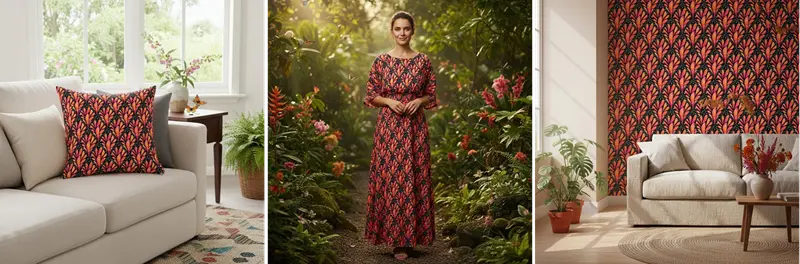
以下是一些结果。Nano Banana在展示图案和将其置于适当的场景中方面做得非常出色。虽然这些图片明显是AI生成的,但它们为原本会相当无聊的帖子增添了视觉趣味。
原文链接: Nano Banana can't make repeat patterns, but the mockups are pretty good.
BimAnt翻译整理,转载请标明出处
本文属于「BIM / IFC」专题。查看专题全部文章 →


